Bitcoin checkout on Replit
Replit Agent builds web apps with an Express server and a Postgres database, and OpenReceive’s Express package runs in them as is. Your app’s own server code creates each Lightning invoice, the payment goes straight to your wallet, and payment attempts are stored in your app’s Postgres database. There is no OpenReceive account, no API key and no background worker.
Optional swaps let customers pay with USDT, USDC, SOL, and ETH. A swap provider you configure converts the payment to BTC over Lightning, and it settles into the same wallet. Available assets and networks depend on the provider.
Use @openreceive/* 0.4.19 or newer.
Before you start
- A receive-only NWC code from your Lightning wallet (get one). It can create invoices and read payments, but it cannot spend.
- Optional: a swap provider code, for USDT, USDC, SOL and ETH (set one up).
Put both in the app’s Secrets, never in the chat. Secrets reach your server code as environment variables, and Replit links them to the published app.
Add checkout to your Replit app
-
Open Tools → Secrets → New Secret. Add
NWC_URIwith your wallet code, thenLSC_URI_PRIMARYwith your swap provider code. Replit already gives every app a Postgres database inDATABASE_URL.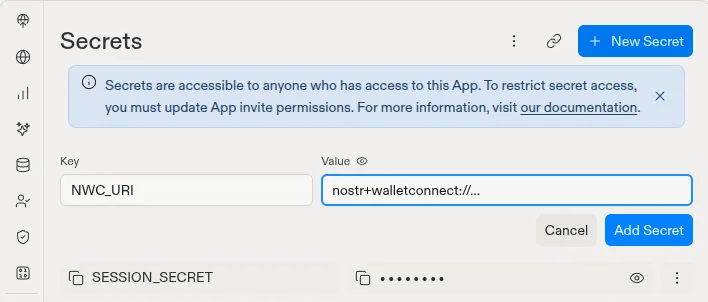
-
Send Replit Agent this prompt:
Add Bitcoin Lightning checkout to this app with OpenReceive. Download the
directions with your terminal and follow them exactly:

curl -fsSL https://openreceive.org/agent-directions/node/full.md

NWC_URI and LSC_URI_PRIMARY are already set as this app's Secrets, and the
server reads them from process.env. Do not ask me for them, and do not look
for them, check them or print them. Mount the payment routes on the Express
server and store payments in this app's Postgres database, through
DATABASE_URL. Create OpenReceive's tables when the server starts (the schema
SQL is idempotent), because a published Replit app gets its own production
database. Use @openreceive packages 0.4.19 or newer.
-
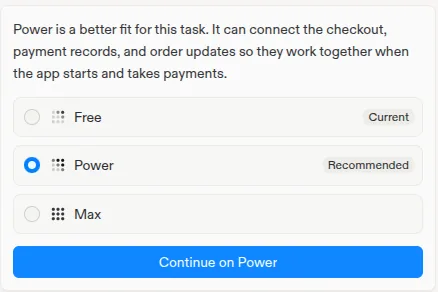
If Agent offers to switch from Free to Power, choose Continue on Power. In Free mode Agent stops partway through this setup. On Power it took about 11 minutes in our test.
The directions tell Agent how to map the three hooks onto your existing orders and how to render the checkout. Agent ends with “Setup is finished” and a link to try the checkout.
This prompt is for apps with a Node server, which is what Replit Agent builds by default. If your app’s server is Python, follow the FastAPI or Django quickstart instead.
Check it
In Preview, place an order. Its checkout shows the payment methods. Pick
Bitcoin to see a Lightning invoice in sats. If the app stops at start, read
the Console: usually NWC_URI is missing from Secrets, or the code is not
receive-only.
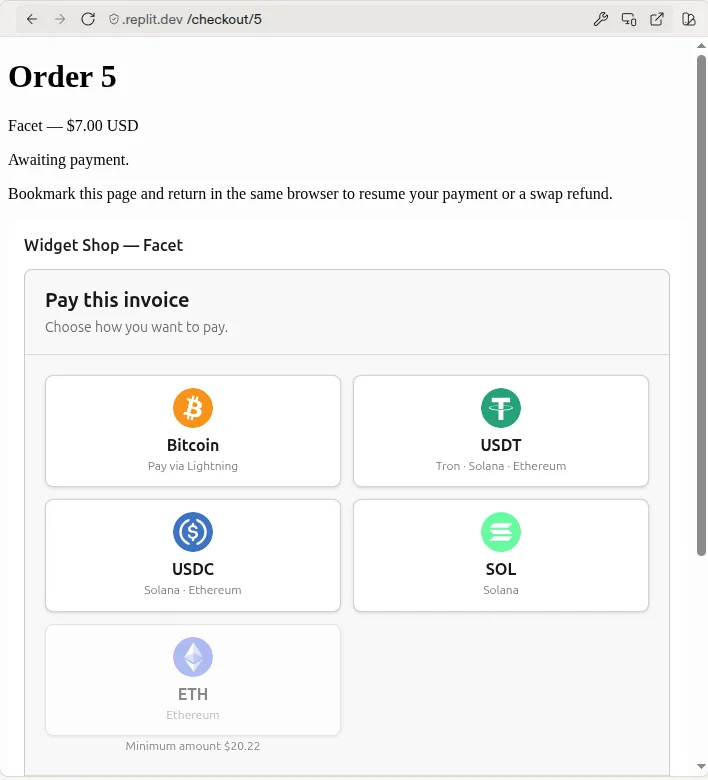
Pay a small order from your wallet to see it settle: the checkout shows the
payment as received, and onPaid marks the order paid.
Publish
-
Select Publish. Under Advanced settings, keep Autoscale, and check that Deployment secrets lists
NWC_URI(andLSC_URI_PRIMARY) with a link icon: Replit copies your Secrets into the published app. If you add a secret after publishing, check this list and republish.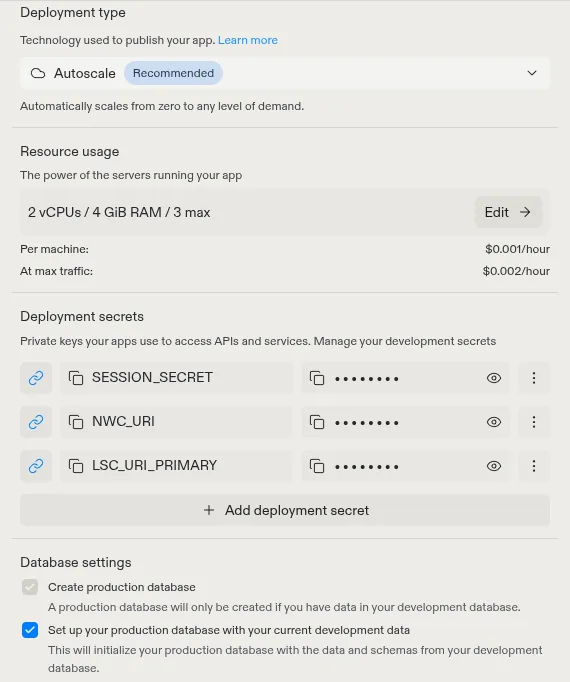
-
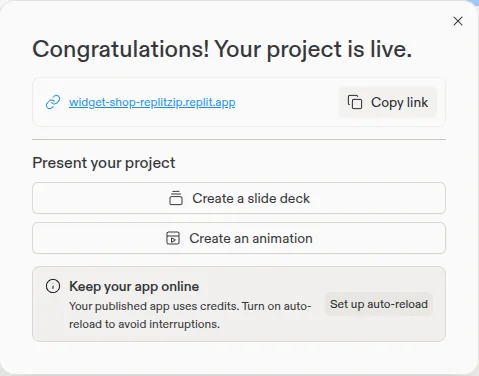
Select Publish and wait for “Your project is live”, about four minutes.
-
Open the
replit.appaddress, place an order and pick Bitcoin. A Lightning invoice appears.
The published app uses its own production database, separate from the one you build with. Replit can start it with a copy of your development data, and the server also creates OpenReceive’s tables there on its first start.
Start from the starter
The Express + Postgres starter
is a one-product shop with checkout already wired, set up for Replit
Autoscale. Its replit.md tells Agent how the payment code fits together, so
you can ask for products, pages and design and keep checkout working. The
README shows how to copy it into a repository of your own and import it into
Replit.
How it runs on Replit
- No worker or cron job. Each request to the payment routes also checks the wallet for settled invoices, through a lock in your database. A payer who closes the tab is settled on the next request, so Autoscale can scale to zero between visits.
- Reserved VM, optionally. A Reserved VM never sleeps, so it can also run the optional notifications worker, which settles a payment the moment the wallet reports it. Autoscale does not need it.
- Direct database connection.
DATABASE_URLpoints at Postgres 16 with no pooler, sopgand the usual ORMs work unchanged. Do not force TLS in code: the development database does not use it and the production database requires it, and each one’s URL already says which. - Port and health check. The server listens on
0.0.0.0. When you publish, Replit requests the home page and fails the publish if it takes more than 5 seconds, so keep slow work off/. - Rate limiting. Keep
rateLimiting: truewithapp.set("trust proxy", 1). Replit’s proxy setsx-forwarded-for, so the limit applies per payer. - Keep order pages reachable. A payer with a swap in progress comes back through the order’s own page to claim a refund. See swap refunds.
More detail: Express quickstart, Payment storage, Security.